OpenCNC3D
Release overview

v0.9.11

Gameplay and controls

OpenCNC3D v0.9.11 Alpha

This release is about how the game plays and how it feels to control. Factories can queue several unit types at once, the Dawn3D skirmish computer now keeps building its base and attacks with tanks as well as infantry, and attack-move fights on the way instead of chasing off. Scrolling, the selection box and the command keys have all been improved, with a Key Bindings page and a Modern mouse scheme as an option. Most changes apply to both Dawn3D and RA3D in every graphics mode.

  • 8 new features
  • 16 improvements
  • 9 fixes

Highlights

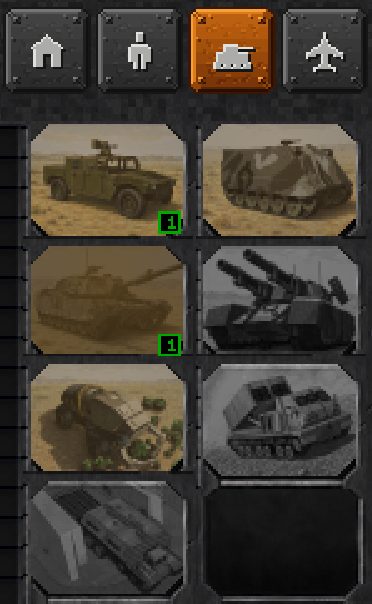
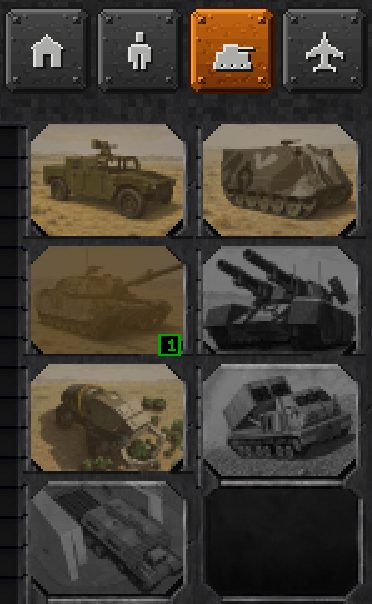
After. Dawn3D Enhanced sidebar, vehicles tab, after clicking Medium Tank, Jeep and Medium Tank. Before: the Medium Tank picture shows 1 and the Jeep picture has no count. After: the Jeep picture also shows 1.
Before: the Jeep is refused. After: it is queued, with a count of 1 on its picture.
01
  • Dawn3D
  • RA3D

Queue several unit types in one factory

Click different units in the same factory tab and each one is queued in the order you clicked, up to nine of each type, with a count on its picture; a right click takes one off. It works on all three sidebars in both games, though RA3D's Enhanced sidebar shows the counts on the pictures only. A queue is not kept in a saved game.
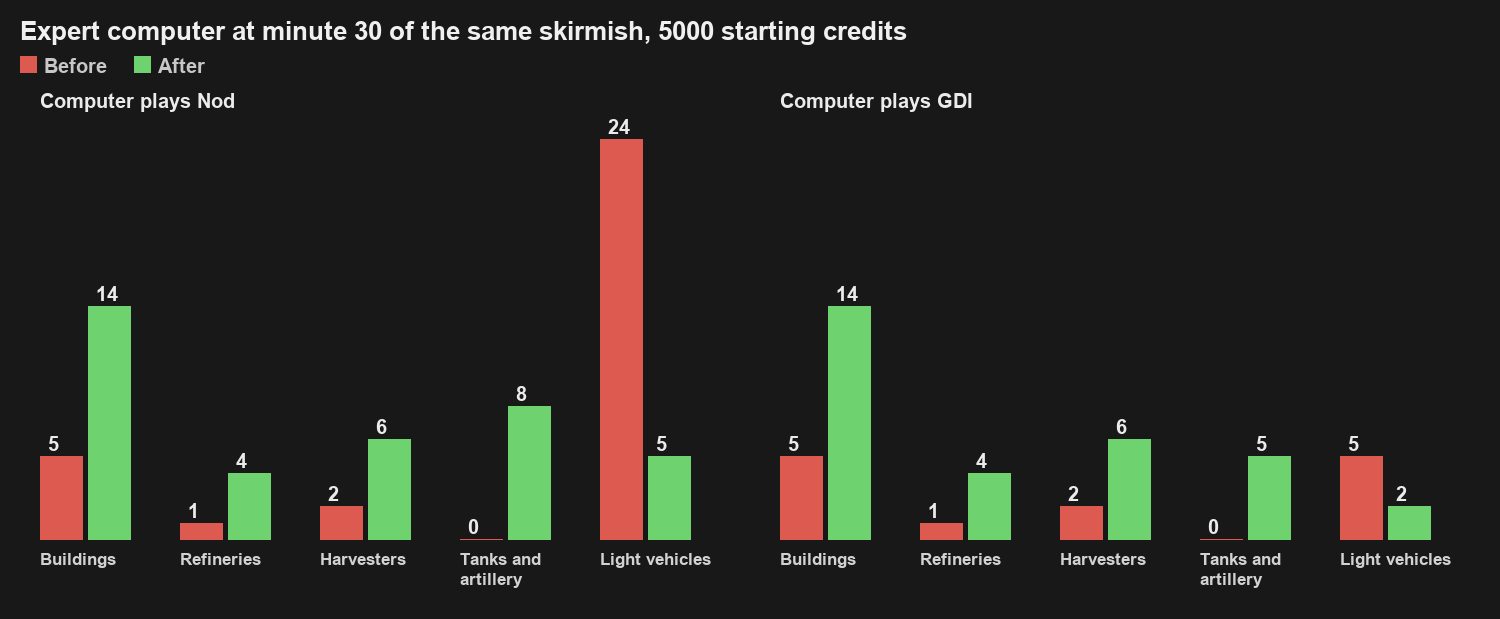
Bar chart of the Expert computer at minute 30 of the same skirmish, before in red and after in green. Playing Nod: buildings 5 and 14, refineries 1 and 4, harvesters 2 and 6, tanks and artillery 0 and 8, light vehicles (buggies, bikes and APCs) 24 and 5. Playing GDI: buildings 5 and 14, refineries 1 and 4, harvesters 2 and 6, tanks and artillery 0 and 5, light vehicles (jeeps and APCs) 5 and 2.
At minute 30 the computer has 14 buildings instead of 5, four refineries instead of one and tanks instead of none, playing either side.
02
  • Dawn3D

The Dawn3D skirmish computer keeps building and sends tanks

The Dawn3D skirmish computer now keeps expanding: at minute 30 of the same match it had 14 buildings instead of 5, four refineries instead of one and a group of tanks instead of none, and tanks now go out in its attack waves. It gets no extra money and no faster harvesting. The RA3D computer is unchanged.

Before: the tanks chase a fleeing buggy and never arrive. After: they destroy the enemy tank in range and reach the point. Shown sped up.
03
  • Dawn3D
  • RA3D

Attack-move fights on the way and arrives

Units given an attack-move order now fight enemies in range, let a fleeing enemy go instead of chasing it across the map, and carry on to where you sent them. Units guarding with the G key chase and return by each game's original rule.

RA3D edge scrolling, before above and after below: Enhanced, Enhanced with uneven frame times, then Classic.
04
  • Dawn3D
  • RA3D

Smoother scrolling, three scroll speeds and edge arrows

Holding the pointer at the screen edge now moves the map by a near-even step every frame: in N64 and Enhanced the view glides over hills instead of bobbing, and Classic scrolls in much more even steps. Settings have separate speeds for the screen edge and arrow keys, right-button drag and middle-button drag, each with a faster top end. Classic and Enhanced show an arrow at the screen edge while the map scrolls.

Before: the box slides away from the pointer. After: it stretches with the map and takes all eight units inside it.
05
  • Dawn3D
  • RA3D

A selection box that follows the map, and one voice answer

Hold a selection box at the screen edge and the map scrolls while the box stretches with it; letting go takes exactly what is inside. The box stops at the sidebar instead of reaching behind it, and its outline matches what it selects in every camera. In RA3D a box over several units now gets one voice answer instead of a chorus; in both games it comes from the unit the original game picks.

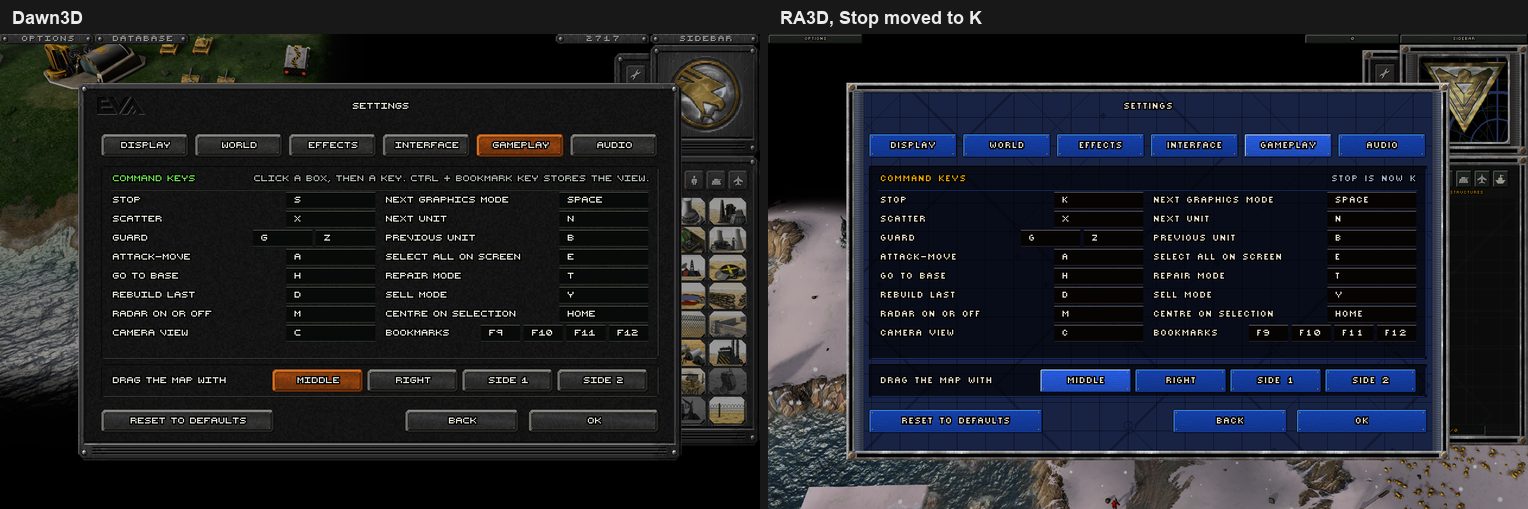
The new Key Bindings page side by side in Dawn3D and RA3D: a table of command keys such as Stop, Scatter, Guard, Attack-move, Next unit, Select all on screen, Centre on selection and Bookmarks, and a row choosing which mouse button drags the map. In the RA3D copy Stop has been moved to K.
The Key Bindings page in Dawn3D and in RA3D, where Stop has been moved to K.
06
  • Dawn3D
  • RA3D

Key Bindings page and a Modern mouse scheme

A new Key Bindings page lets you rebind stop, scatter, guard and the other command keys, and choose which mouse button drags the map. The mouse scheme offers Classic (the default), Left hand and Modern, where the left button selects and the right button gives orders. More of the engine's own command keys now work, including next and previous unit, select all on screen, centre on selection and camera bookmarks.

Dawn3D Enhanced, slowed down: before, the soldier stands still after his new order; after, he moves off at once.
07
  • Dawn3D
  • RA3D

Soldiers move off at once

A soldier given a new move order while already on the move now walks off straight away instead of standing still for up to about a second. This applies in both games and every graphics mode, and is the same for every player in multiplayer.

Dawn3D Enhanced: a selected Rocket Launcher and Obelisk, each with a slowly turning dashed range circle.
08
  • Dawn3D
  • RA3D

Weapon range circles for launchers and defences

Selecting your own rocket launcher (Rocket Launcher, S.S.M. Launcher, V2) or a firing defence such as a Guard Tower, Obelisk or Tesla Coil draws its weapon reach on the ground as a light dashed circle that turns slowly; soldiers and tanks get none. It shows in Classic, N64 and Enhanced in both games. On the longest ranges the circle can reach slightly further than the game's own range rule between the four straight directions.

Before: your cloaked tank stays nearly solid. After: it becomes a dark see-through ghost, in N64 and Enhanced.
09
  • Dawn3D

Your own cloaked Stealth Tank reads as cloaked

In N64 and Enhanced your own cloaked Stealth Tank is now a dark see-through ghost instead of staying nearly solid, and Enhanced shows the ground shimmering through it. Classic is unchanged, and enemy Stealth Tanks still fade from view, now with the shimmer in Enhanced.

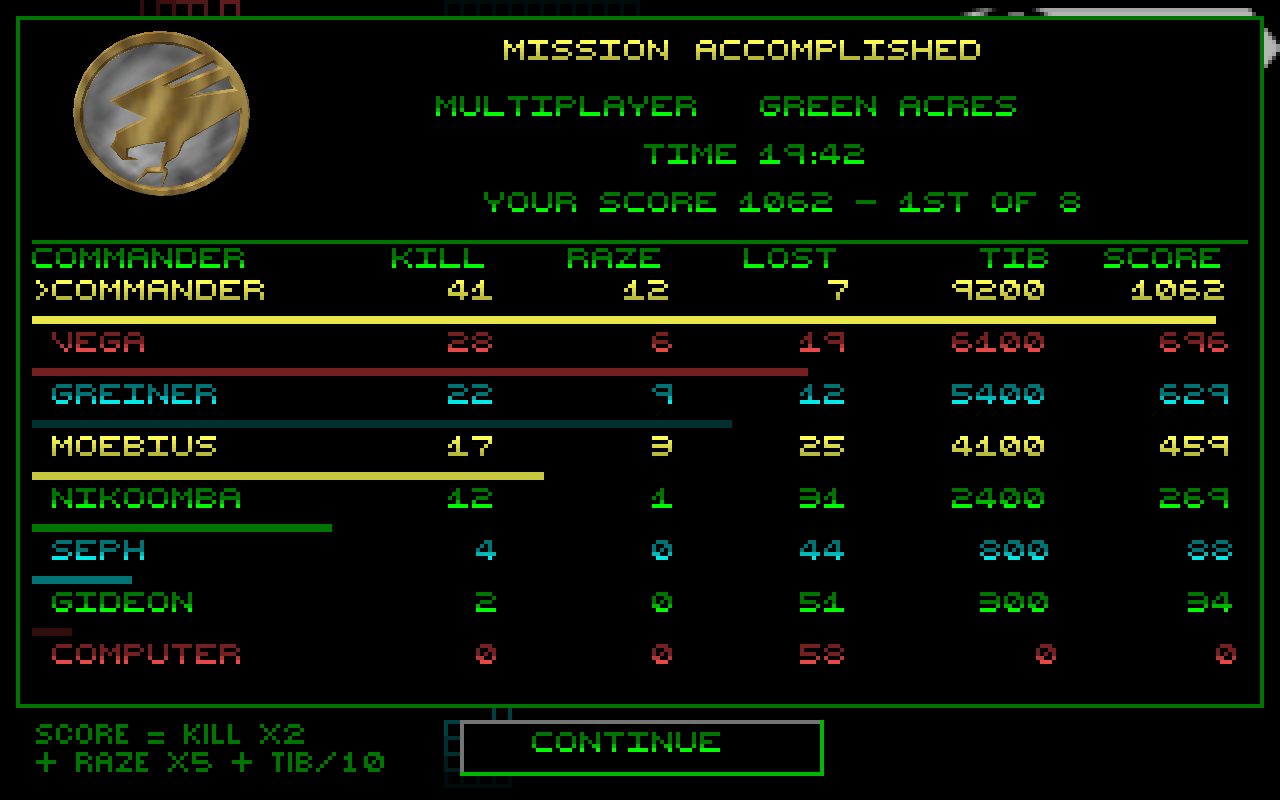
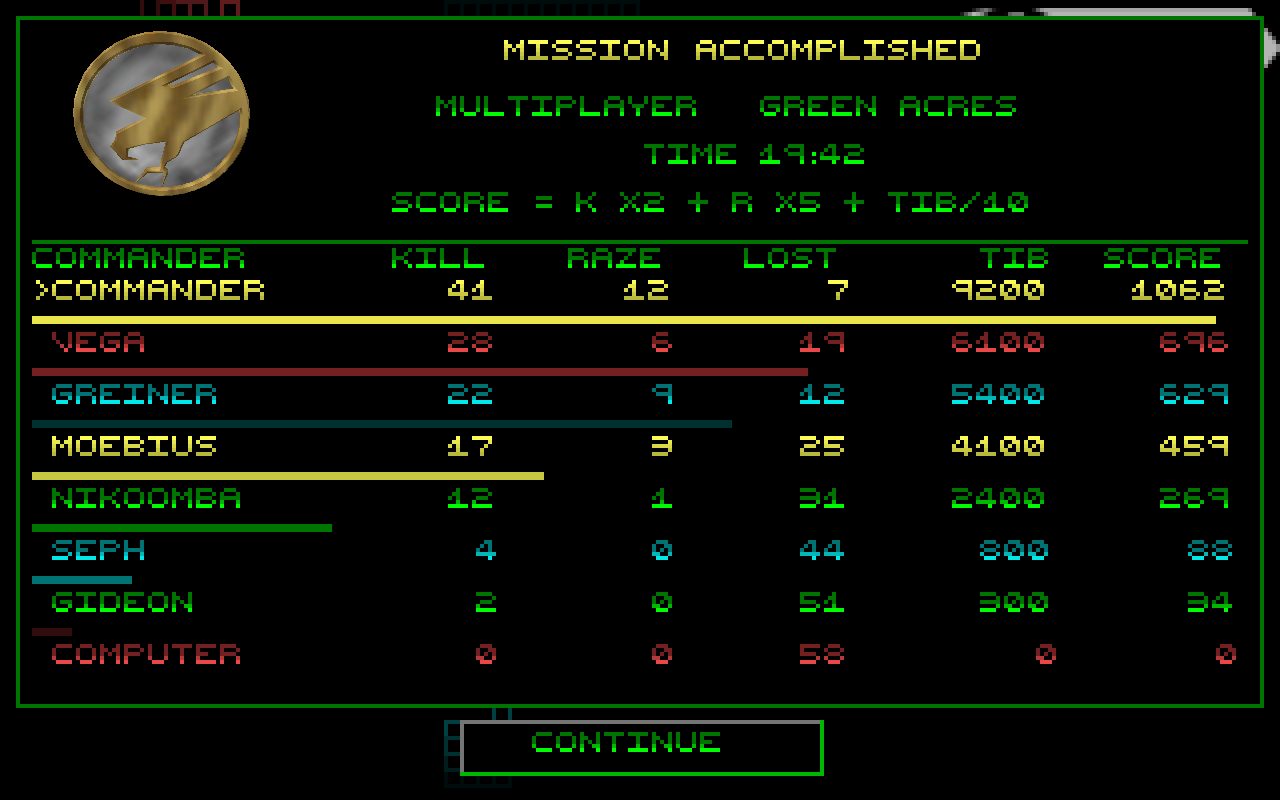
After. An example Dawn3D Mission Accomplished screen from a multiplayer game, with a table of eight commanders. Before: the line under TIME reads SCORE = K X2 + R X5 + TIB/10. After: it reads YOUR SCORE 1062 - 1ST OF 8, and the formula sits in small text beside CONTINUE.
An example result screen. Before: the scoring formula where your result should be. After: your own score and place, with the formula beside CONTINUE.
10
  • Dawn3D
  • RA3D

Your own score on the result screen

At the end of a skirmish or network game, Dawn3D's result screen now shows your own score and place, such as YOUR SCORE 1062 - 1ST OF 8, where it used to show the scoring formula; the formula moves to a small note beside CONTINUE. RA3D's end screen shows your score as well.

With sound: a build clicked with 0 credits. Before: only Building. After: Building, then Insufficient funds.
11
  • Dawn3D

Insufficient funds when you are out of money

In Dawn3D, clicking to build with almost no money (under 100 credits) now gets the Insufficient funds warning at the click, and the game's own money reminder does not repeat it straight after.


Everything in v0.9.11

New features8

  • Factories queue several unit types at once, up to nine of each, with a count on each picture.
  • Add a Key Bindings page for the command keys and the mouse button that drags the map.
  • Add a Modern mouse scheme (left selects, right orders) beside Classic and Left hand.
  • More of the engine's command keys work: next and previous unit, select all on screen, centre on selection and camera bookmarks.
  • A selected rocket launcher or firing defence shows its weapon range as a slowly turning dashed circle.
  • Separate scroll speeds for the screen edge and arrow keys, right-button drag and middle-button drag.
  • Classic and Enhanced show an arrow at the screen edge while the map scrolls.
  • Skirmish and network result screens show your own score and place, in both games.

Improvements16

  • The Dawn3D skirmish computer keeps building its base, adds refineries and sends tanks in its attacks.
  • Your own cloaked Stealth Tank is a dark see-through ghost in N64 and Enhanced, with the ground shimmering through it in Enhanced.
  • Attack-move fights enemies in range, gives up long chases and carries on to its destination.
  • Soldiers re-ordered on the move walk off at once.
  • A held selection box stretches as the map scrolls and takes exactly what it shows.
  • The selection box outline matches what it selects in every camera.
  • In RA3D a drag box over several units gets one voice answer instead of a chorus, and in both games the answer comes from the unit the original game picks.
  • Edge scrolling moves a near-even step every frame, and the N64 and Enhanced views glide over hills.
  • Scrolling is smoother and each scroll speed has a faster top end.
  • Dawn3D says Insufficient funds at the click when a build is started with almost no money, without the game's reminder repeating it.
  • In Dawn3D campaign missions, units a captured factory unlocked leave the sidebar with it, and any in production are refunded.
  • Nod's S.S.M. Launcher has its own grey sidebar slot before it can be built.
  • A Dawn3D save too old to load says it was made by an earlier version, and the file is kept.
  • A window at desktop size sits above the taskbar, to address the bottom screen edge not scrolling the map.
  • In full screen, the bottom screen row scrolls the map even with the taskbar or Dock slid over it, to address the bottom edge not scrolling.
  • The map editor opens at the game's own eye height.

Bugs fixed9

  • Fix Dawn3D saves from v0.8.0 to v0.9.6 refusing to load.
  • Fix the next save crashing after a Dawn3D save failed to load.
  • Fix the selection box taking units hidden behind the sidebar.
  • Fix G-key guards chasing too far in RA3D and waiting at the map edge in Dawn3D.
  • Fix Classic scrolling south slower than the other directions.
  • Fix a right-button drag started low on the screen scrolling about a quarter as fast.
  • Fix sidebar tooltips naming the wrong requirements, such as GDI buildings for Nod units.
  • Fix Nod mission 3's prison being named Technology Center.
  • Fix RA3D vehicles cloaked by a crate leaving bright lamp light behind in Enhanced.